
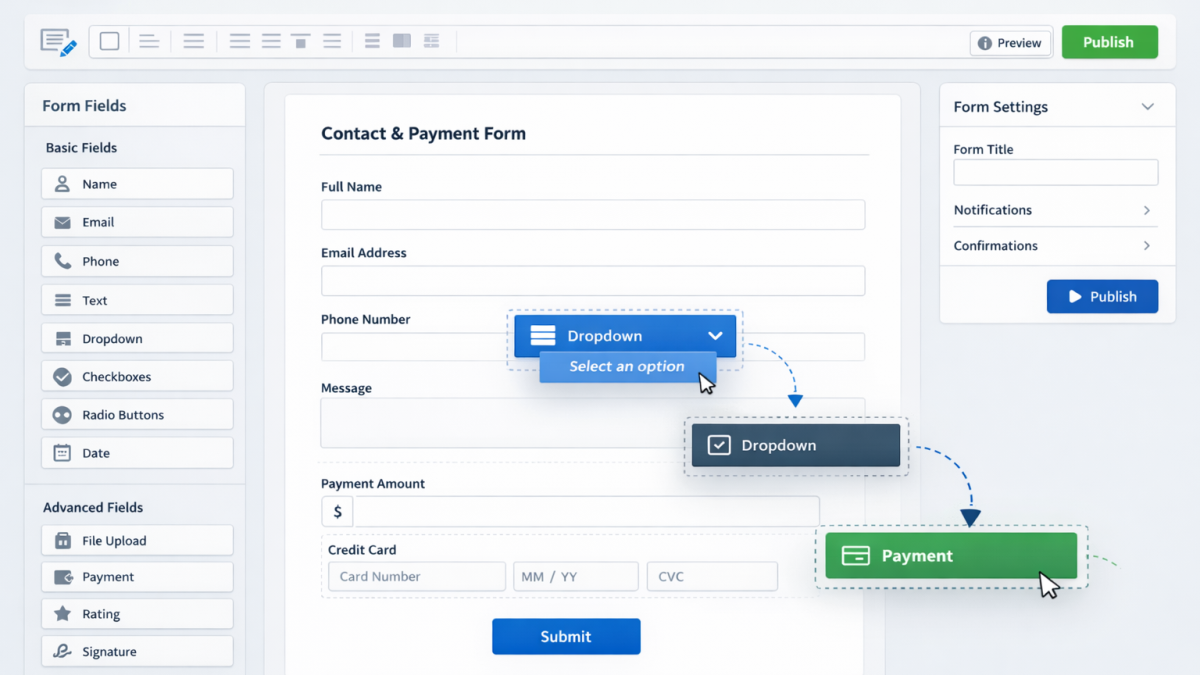
If you need a tool for lead forms, payment forms, approval flows, e-signatures, and automated workflows, this Jotform review will help you decide whether it is the right fit.
Jotform describes itself as an online form builder that can handle conditional logic, payments, reports, and workflow automation. Its broader product lineup also includes Jotform Sign, Approvals/Workflows, and payment workflow tools.
This Jotform review is most useful for small businesses, agencies, service providers, creators, coaches, and online sellers who want a flexible data-collection and workflow tool without coding.
If you want to compare it with our broader creator stack, visit our Recommended Tools & Resources page.
Jotform Review: What It Is and Who It’s Best For
Jotform is built for people who need more than a basic contact form.
Based on Jotform’s official pages, it is well suited for:
- businesses collecting leads
- teams managing approvals
- users accepting payments through forms
- businesses sending documents for e-signature
- organizations automating repetitive workflow steps
It makes the most sense if you want to:
- create forms quickly
- connect forms to approval steps
- collect payments
- automate notifications
- reduce manual follow-up work
Jotform Review: Core Features
One reason Jotform stands out is that it covers multiple operational tasks in one platform.
Based on its official pages, key features include:
- drag-and-drop form builder
- conditional logic
- payment integrations
- reports
- approval workflows
- e-signatures
- workflow automation
- email notifications
- tracking through Inbox and Tables
That makes Jotform useful for businesses that need both front-end form collection and back-end process handling.
How Jotform Works
At a basic level, Jotform lets you create a form, collect submissions, and turn those submissions into actions.
A typical business setup looks like this:
- build a form
- collect responses or payments
- trigger approval or workflow steps
- send notifications
- track activity in Jotform tools like Inbox or Tables
This is especially useful for intake forms, quote requests, order forms, internal approvals, and signature-based processes.
Pricing and Plans
Pricing is a big part of any Jotform review.
Jotform’s official pricing pages show a Starter plan that includes standard features such as templates, payment integrations, and widgets, while paid plans increase usage limits and remove branding. Jotform’s own blog also states that it has five pricing tiers: Starter, Bronze, Silver, Gold, and Enterprise.
That means Jotform is accessible for beginners through the free tier, but businesses with higher submission volume or branding needs will likely need a paid plan. That last sentence is an inference based on Jotform’s own description of Starter-plan limits and branding.
Pros and Cons
Pros
- free plan available
- payments supported
- approvals and workflow tools available
- e-signature support
- broad business use cases
- drag-and-drop setup
Cons
- free plan includes branding
- limits increase only on paid plans
- advanced workflows may be more than some users need
- businesses with very simple needs may prefer a lighter form tool
The last two points are reasonable inferences from Jotform’s broad product set and tiered limits.
Is Jotform Worth It?
For many businesses, yes.
Jotform is worth considering if your priority is:
- collecting leads
- taking payments through forms
- automating approval steps
- gathering signatures
- replacing scattered manual processes with one system
It is especially attractive for:
- service businesses
- agencies
- small teams
- consultants
- internal operations workflows
- businesses using forms as a core part of sales or admin processes
If your needs are limited to one simple contact form, Jotform may be more platform than you need. But for businesses running forms across sales, payments, approvals, and operations, it can be a strong fit.
Final Verdict
Jotform remains one of the most versatile form platforms for businesses that want more than simple lead capture. Its official tools extend into approvals, signatures, and workflows, making it useful for both customer-facing and internal processes.
This Jotform review shows that the platform is best for users who want flexible forms, business workflow options, and room to grow beyond basic submissions.
👉 You can explore Jotform and current options on our Recommended Tools & Resources page.
FAQ
Is Jotform free?
Yes. Jotform’s pricing page says the Starter plan is free and includes standard features, though limits are lower and branding remains on free forms.
Can Jotform accept payments?
Yes. Jotform says its forms can accept payments, and its workflow features also support payment collection steps.
Does Jotform have approval workflows?
Yes. Jotform Approvals and Workflows are designed to automate approval processes, send notifications, and track activity.
Does Jotform support e-signatures?
Yes. Jotform Sign is part of the platform and is positioned as a complete e-signature solution.
Is Jotform good for small businesses?
Yes, especially for small businesses that need forms, payments, approvals, and workflow automation without custom development. That conclusion is supported by Jotform’s feature set and free-to-paid plan structure.